โ† Main Home ๐Ÿ”‹ Laptop Battery Replacement Unit
Swollen & Draining Batteries Fixed โ€ข $80 Diagnostic (Inside Repair Fee) โ€ข Brand-New Certified Cells โ€ข $0 Call-Out
Certified A-Grade Cells โ€ข Same-Day Sourcing

Laptop Battery Replacement Brisbane.
Swollen, Draining & Dead Batteries Fixed.

Does your laptop shut down the second you unplug it? Is your battery draining from 100% to zero in 20 minutes, or is your trackpad lifting from a dangerous swollen battery?

We supply and professionally fit brand-new, certified OEM and high-capacity Grade-A lithium-ion batteries across Brisbane. Drop into our East Brisbane, Toowong, or West End workshops, or have our mobile technician come directly to your home or office with $0 call-out fees.

โšก $80 Diagnostic Inside Fee

Credited 100% into repair when you proceed

๐Ÿ›ก๏ธ Swollen Battery Safety

Zero-puncture chemical adhesive extraction

โ™ป๏ธ Eco-Friendly Recycling

B-cycle certified hazardous e-waste disposal

โœš Fast Battery Quote & Booking

Direct to local Brisbane technician โ€ข Rapid response

$80 Fixed Full Diagnosis
$0 Call-Out Fee

๐Ÿ”’ 100% privacy guaranteed. $80 diagnostic credited into repair total.

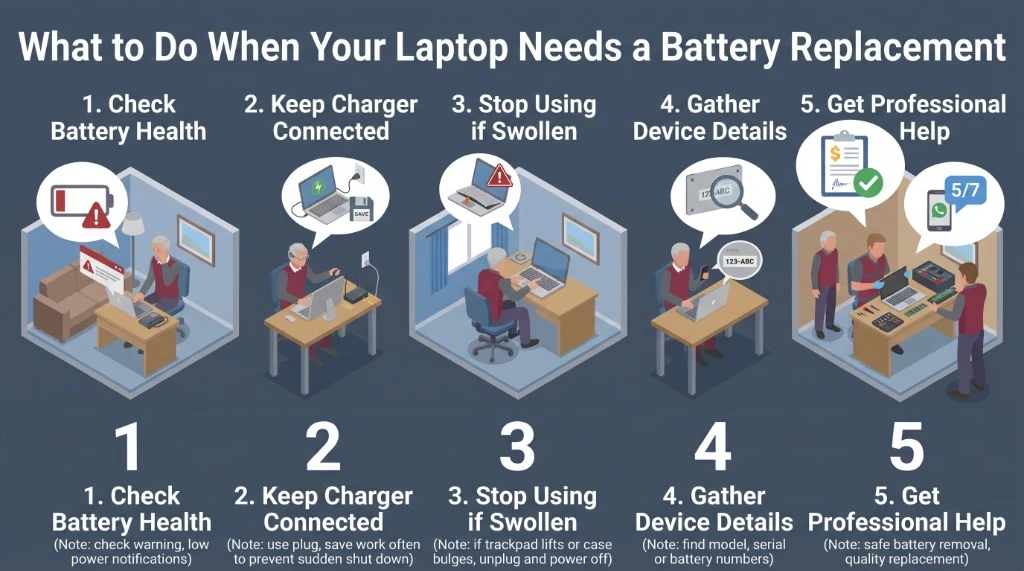
What to Do When Your Laptop Needs a Battery Replacement

Follow these 5 steps to protect your data, prevent battery fire hazards, and get an exact fixed replacement quote.

๐Ÿ”‹ Safety & Replacement Guide What to do before and during battery replacement
What to Do When Your Laptop Needs a Battery Replacement - 5-Step Process Infographic
01

1. Check Battery Health

Check your system warnings. Modern operating systems alert you before a battery fails completely:

๐ŸชŸ Windows: Open command prompt, type powercfg /batteryreport to see cycle count and full charge capacity vs design capacity.
๐Ÿ macOS: Click Apple Menu > System Settings > Battery > Battery Health. Look for *"Service Recommended"* or *"Replace Soon"*.
โฑ๏ธ Runtime Check: If runtime drops below 30 minutes, internal cells have reached chemical end-of-life (typically 300โ€“500 cycles).
Tip: We run full battery diagnostics in 5 minutes
02

2. Keep Charger Connected (Save Work)

If the battery is NOT swollen, keep your AC power adapter connected while you save your essential documents and files:

๐Ÿ’พ Prevent Corruption: A worn battery can cut power without warning, corrupting open spreadsheets, accounting software, or databases.
โ˜๏ธ Cloud Sync: Ensure OneDrive, Google Drive, or iCloud finishes syncing before powering down.
โš ๏ธ Charging Note: If the charger tip gets scorching hot or begins melting, unplug it immediately (see our DC jack repair service).
Save frequently to avoid data loss
03

3. STOP USING IF SWOLLEN

A bulging battery is not just an inconvenienceโ€”it is an active chemical hazard under internal pressure:

๐Ÿ–ฑ๏ธ Trackpad Lifting: The battery sits directly underneath the trackpad in MacBooks and modern Windows laptops. If the trackpad won't click or is raised, the battery has inflated.
โšก Acute Fire Risk: Do NOT continue charging. Do NOT puncture the pouch. Lithium reacts violently with oxygen.
๐Ÿ›‘ Immediate Action: Turn off the machine, unplug the power cord, and place the laptop on a non-flammable surface until our tech handles it.
โš ๏ธ Critical Safety: Never push down on a swollen trackpad
04

4. Gather Device & Battery Details

To get a fixed quote in under 5 minutes, locate your machine's identifier so we can confirm warehouse stock:

๐Ÿท๏ธ Dell Service Tag: 7-digit code (e.g. 4K92MZ1) on the bottom chassis identifies the exact battery part code (e.g. 33YDH, 56Wh).
๐Ÿ Apple "A" Number: Located on the back lid text (e.g. A2337 for M1 Air, A1989 for Pro 13").
๐Ÿ’ป HP / Lenovo / ASUS: Check the model sticker (e.g. HP Pavilion 15-eg, Lenovo ThinkPad T14 Gen 2).
Tip: Text a photo of the bottom label to 0401 148 654
05

5. Get Professional Technician Help

Modern laptop batteries are chemically glued into fragile chassis assemblies and require specialized workshop tools:

๐Ÿงช Chemical De-Bonding: We use specialized battery adhesive solvents that release industrial glue strips without prying or bending delicate lithium foil.
โšก BMS Calibration: We verify the battery management system (BMS) handshake, power delivery ICs, and calibrate charging cycles.
โ™ป๏ธ Responsible Recycling: We safely deliver your spent or hazardous cells to accredited Brisbane e-waste recycling stations.
โœ“ 100% Upfront Fixed Quote โ€ข 12-Month Cell Warranty
โ˜€๏ธ

The Brisbane Climate Factor: Why Laptop Batteries Swell Faster Here

South East Queensland's combination of high summer temperatures (frequently exceeding 32ยฐC) and elevated humidity creates a challenging operating environment for modern lithium-polymer (LiPo) laptop batteries. When a laptop is left plugged into AC power 24/7 on a soft surfaceโ€”such as a bed, sofa, or tablecloth in an un-airconditioned roomโ€”internal chassis temperatures can easily surpass 45ยฐC.

At elevated temperatures, the organic electrolyte inside the lithium pouch breaks down, generating carbon dioxide, carbon monoxide, and volatile hydrocarbon gases. Because modern pouch batteries are hermetically sealed, these gases inflate the protective foil like a pillow. This expansion places immense mechanical pressure on your laptop's delicate keyboard, trackpad, and motherboard screw mounts. If you notice any warping, having the battery replaced promptly saves your laptop from catastrophic chassis deformation.

Laptop Battery Replacement Pricing (Brisbane Metro)

Zero hidden costs. Labour + brand-new certified battery + testing + safe recycling included.

Laptop Brand & Battery Category What Is Included Fitted Price Range
Standard Internal Windows Laptop Battery
Dell Inspiron, HP Pavilion, Lenovo IdeaPad, Acer Swift
Brand new OEM-spec battery, precision installation, charging calibration, safe hazardous waste recycling. $130 โ€“ $190
Performance & Ultrabook Batteries
Dell XPS 13/15, HP Envy/Spectre, Lenovo ThinkPad T/X Series, ASUS ZenBook
High-capacity 56Whโ€“97Wh genuine cell replacement, thermal check, power rail inspection, chassis realignment. $160 โ€“ $240
Apple MacBook Battery Replacement
MacBook Air & MacBook Pro 13", 14", 15", 16" (M1/M2/Intel)
Specialized chemical adhesive dissolution, multi-cell pack installation, SMC / battery microcontroller reset, full cycle test. $180 โ€“ $280
Diagnostic Fee Complete physical and electronic battery health check. 100% credited into your repair total if you proceed. $80 (Credited)
Mobile Call-Out & Travel Fee We come directly to your home or office anywhere across Brisbane. $0 FREE
Senior & Pensioner Community Discount Available on all labour charges upon presentation of Seniors or Pensioner card. 10% Off Labor

Real Battery & Power Repair Reviews

Authentic customer testimonials from our Google Business Profiles across Brisbane.

Antoine Camus

Verified Google Review โ€ข Toowong Hub
โ˜…โ˜…โ˜…โ˜…โ˜…
๐Ÿ“ Toowong Workshop Hub
โšก Urgent Battery & Melting Power Connector Repair
“My computer had an urgent problem with the battery, the tip was melting when I plugged it to my computer and it resulted in a contact failure so that I couldn't recharge the battery at all. I absolutely needed it for my work and John did all his best to get the job done within the day and for a very good price! The result is far beyond what I expected and John even took the time to keep me updated about the repair process. Very professional, efficient and friendly!”

Adam English

Verified Google Review โ€ข East Brisbane Hub
โ˜…โ˜…โ˜…โ˜…โ˜…
๐Ÿ“ East Brisbane Workshop Hub
๐Ÿ’ป On-Premises PC Diagnostic & System Recovery ($0 Call-Out)
“Computer Repairs Fast came to my premises to fix a PC that wouldn't start up. Aykut was extremely knowledgeable, explained the whole process and the steps that were needed for recovery of the PC. Thanks again Aykut and Computer Repairs Fast for the reliable, friendly service. Adam.”

Frequently Asked Questions About Laptop Batteries

How do I know if my laptop battery is swollen?

Look for physical cues: your trackpad feels hard to click or physically rises above the aluminum or plastic palmrest, the laptop wobbles when placed on a flat desk, or you notice a gap splitting between the upper and lower casing seams. If you spot any swelling, power off the laptop and unplug it immediatelyโ€”lithium cells expand under gas pressure and represent an acute fire hazard.

How long does a laptop battery replacement take?

For most popular models (such as Dell Inspiron/XPS, Lenovo ThinkPad, Apple MacBook Air, and HP Pavilion), we carry certified replacement cells in stock or can access our Brisbane warehouse within 2 to 4 hours. Once the part is on the bench, installation, de-bonding, testing, and BMS calibration takes approximately 45 to 90 minutes.

Can I just keep using my laptop with the charger plugged in?

If the battery is merely degraded (holding low capacity but physically flat), keeping it plugged in is generally safe for short-term use. However, if the battery is swollen or overheating, you must NOT leave it plugged in. Continuous charging of a compromised battery pushes volatile electrolyte gases further, increasing the risk of thermal runaway and battery rupture.

Do you use original OEM or aftermarket batteries?

We source brand-new OEM original batteries and certified Grade-A premium replacement packs built with genuine Tier-1 cells (Samsung, LG, Panasonic, or Simplo). Every battery we install includes complete overcharge and thermal circuit protection, matches the exact voltage and watt-hour specification of your machine, and comes backed by our 12-month replacement warranty.

Do you charge a call-out fee to replace the battery at my home?

No. We provide $0 call-out fees for mobile laptop repair across Brisbane metro. Our technician can come directly to your home or office, inspect the battery, and complete the installation on-site. If you prefer, you can also drop your laptop off at any of our 3 Brisbane workshop hubs in East Brisbane, West End, or Toowong.

Visit a Workshop or Book Mobile Dispatch

Drop off your laptop at a local hub or have a senior technician come to you with zero travel surcharge.

East Brisbane Workshop

Address: 93 Duke St, East Brisbane QLD 4169
Phone: 0401 148 654
Google Reviews: โญ 91 Reviews (5.0โ˜…)

Hub Details Google Maps โ†—

Toowong Workshop

Address: 38 Jephson St, Toowong QLD 4066
Phone: 0401 148 654
Google Reviews: โญ 10 Reviews (4.9โ˜…)

Hub Details Google Maps โ†—

West End Workshop

Address: 11 Montague Rd, West End QLD 4101
Phone: 0401 148 654
Google Reviews: โญ 11 Reviews (4.6โ˜…)

Hub Details Google Maps โ†—